Chrome extension development
Custom Chrome extensions that work where your team works
Our award-winning U.S. engineering team builds Chrome extensions that automate workflows, integrate your SaaS, and deliver in-browser experiences your users will love.

- 300+Projects completed
- 800M+Saved for clients
- 20+Years building software
- 95%Client retention






Before and after
From repetitive clicks to in-browser workflows
What changes when the tools your team needs live right inside the browser.
- Before
Repetitive clicks
Staff repeat the same steps on the same web pages every day.
AfterAutomate anywhere
Reliable in-browser workflows replace repetitive clicks.
- Before
Constant tab switching
Users jump between your CRM, SaaS tools, and internal apps to finish one task.
AfterIntegrate deeply
API, CRM, and SaaS integrations where users already work.
- Before
Fragile workarounds
One-off scripts and bookmarklets break and are hard to maintain.
AfterScale with confidence
Clean, secure codebases designed for performance and growth.
- Before
Generic off-the-shelf tools
Public extensions do not fit your workflow or your data.
AfterExtend your existing tools
Built around your pain points, with full control over features.
Use cases
Popular Chrome extension use cases
Data and web scraping
Collect targeted data from websites, such as competitor pricing, market trends, or contact information, and organize it into structured formats for analysis or reporting.
- Competitor pricing
- Market trends
- Structured exports
Workflow automation
Automate repetitive tasks like data entry, content publishing, or scheduled communications right from the Chrome toolbar.
- Less manual effort
- Runs from the toolbar
Custom notifications
Deliver real-time alerts on defined triggers, such as stock price changes, social media mentions, or website downtime.
- Real-time triggers
- Alerts when it matters
Document management
Manage and organize documents within the browser with quick access, tagging, and automated sorting by content or metadata.
- Document tagging
- Automated sorting
Time tracking
Track time across tasks or projects, send reminders for breaks or deadlines, and generate clear productivity reports.
- Task and project tracking
- Reminders and reports
Interactive dashboards
Pull data from sales, support, or analytics tools and present key metrics in interactive dashboards for quick decisions.
- Multiple data sources
- Key metrics at a glance
Language translation
Translate on-page content or add localization features to reach and support global users in the browser.
- On-page translation
- Localization
E-commerce
Enhance online shopping with price tracking, inventory alerts, or automated coupon discovery.
- Price tracking
- Inventory alerts
Learning and onboarding
Deliver guided tours, tips, and instructional content inside the web applications employees and customers already use.
- Guided tours
- In-app tips
Accessibility upgrades
If you have an idea for a custom Chrome extension, the possibilities are wide open. Talk it through with an expert on a free consultation.
- Internal or public
- Built around your idea
What our clients say
We appreciated their willingness and eagerness to think of ways to make the application even more powerful.
They have an A+ in effective and active listening.
Have an idea for a Chrome extension?
Talk through your concept with an expert and explore what is possible. No commitment required.
Case studies
Software we have delivered
 Manufacturing
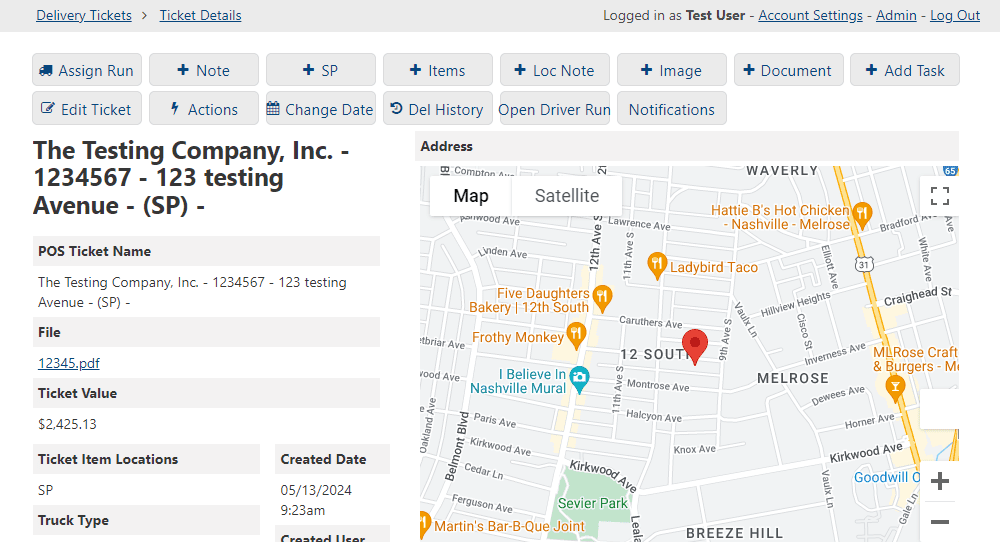
Customer Notification System for Walker Lumber
- [X]
- with the label delivery events automated (scheduled and in transit)
- [X] hrs
- with the label saved per week, from dispatcher and customer service time no longer spent checking and relaying delivery status
Automated SMS updates replaced the “where’s my order?” calls, and failed messages stopped slipping through.
Read the case study Manufacturing
Robust Inventory Management System for Roto Mart
- [X]%
- with the label faster order fulfillment, or fewer stock surprises
- [X] hrs
- with the label saved per week, from time no longer spent chasing status across tools
Transformed multi vendor inventory operations with a centralized system that tracks order history, active orders, and backorders in one place.
Read the case study
A clear path from idea to impact.
Understand the challenge. Build the right solution. Keep moving forward.
 01
Understand
Get clear on your goals and what’s getting in the way.
 02
Plan
Turn priorities into a practical roadmap.
 03
Build
See progress. Test early. Launch with confidence.
 04
Grow
Keep your system supported and ready for what’s next.
On camera
Clients on what changed after launch
A couple of minutes each on how the build ran, what changed in the operation, and what they would tell a team considering custom software.
““Kelson was super responsive, knew exactly how to take care of my issue, and did so quickly for a reasonable price. 10/10 recommended, I am happy to be used as a reference if needed.””
The basics
What are Chrome extensions?
Chrome extensions are like apps for your web browser. A custom extension tailors the browser to your business needs, and can even generate revenue when sold on the Chrome Web Store. Grammarly, Honey, and Adblock Plus are all extensions.
- Projects complete
- 300+
- Saved for clients
- 800M+ dollars
- 01
87% Faster daily workflows
After replacing manual steps with automations.
- 02
6 weeks Time to MVP
For the first production release.
- 03
NPS 70+ User satisfaction
With in-browser experiences.
Chrome Extensions FAQs
Why choose Ksense to build my Chrome extension?
Our team has an in-depth understanding of the Chrome platform and provides full-stack services. We build tailor-made solutions, stay on as a long-term partner, and give you full control over design and features.
What types of Chrome extensions can you build?
Browser action extensions, page-based tools, background scripts, and fully integrated workflow extensions, for internal productivity, customer-facing features, or extensions tied to existing systems.
Can you integrate a Chrome extension with our existing systems?
Yes. Extensions can securely exchange data with CRMs, APIs, databases, internal tools, and third-party platforms.
Do you handle UI/UX design for Chrome extensions?
Yes. We design intuitive, purpose-built interfaces that feel native to Chrome, with a focus on usability, accessibility, and clarity.
Can our extension be used internally or published publicly?
Both. We build for internal use or prepare the extension for the Chrome Web Store, meeting Chrome’s technical and policy requirements either way.
How long does Chrome extension development take?
Simple extensions may take a few weeks; advanced or enterprise-grade solutions take longer. We provide clear timelines and milestones once requirements are defined.
Do you provide ongoing maintenance and updates?
Yes. We handle bug fixes, feature enhancements, Chrome API updates, and long-term maintenance, with a dedicated point of contact.